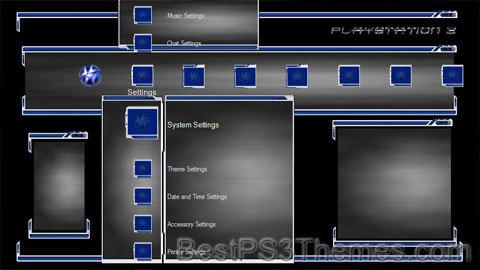
What’s on your PS3? Mk2

What’s on your PS3? Mk2 theme by Robert Waston

Download: WhatsonyourPS3Mk2.p3t
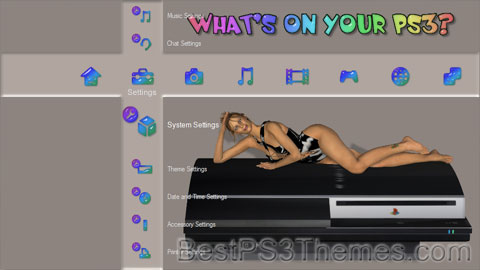
What’s on your PS3? Mk2 Theme
(4 backgrounds)

P3T Unpacker v0.12
Copyright (c) 2007. Anoop Menon

This program unpacks Playstation 3 Theme files (.p3t) so that you can touch-up an existing theme to your likings or use a certain wallpaper from it (as many themes have multiple). But remember, if you use content from another theme and release it, be sure to give credit!

Download for Windows: p3textractor.zip

Instructions:

Download p3textractor.zip from above. Extract the files to a folder with a program such as WinZip or WinRAR. Now there are multiple ways to extract the theme.

The first way is to simply open the p3t file with p3textractor.exe. If you don’t know how to do this, right click the p3t file and select Open With. Alternatively, open the p3t file and it will ask you to select a program to open with. Click Browse and find p3textractor.exe from where you previously extracted it to. It will open CMD and extract the theme to extracted.[filename]. After that, all you need to do for any future p3t files is open them and it will extract.

The second way is very simple. Just drag the p3t file to p3textractor.exe. It will open CMD and extract the theme to extracted.[filename].

For the third way, first put the p3t file you want to extract into the same folder as p3textractor.exe. Open CMD and browse to the folder with p3extractor.exe. Enter the following:
p3textractor filename.p3t [destination path]Replace filename with the name of the p3t file, and replace [destination path] with the name of the folder you want the files to be extracted to. A destination path is not required. By default it will extract to extracted.filename.
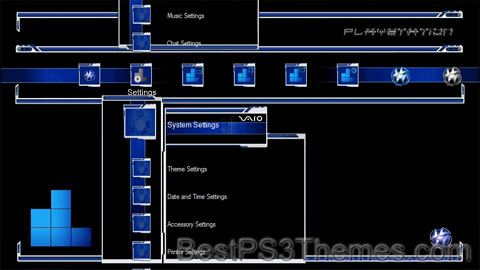
The Vaio PSN (w/ Custom Sounds)

The Vaio PSN (w/ Custom Sounds) theme by Dj4NRv

Download: TheVaioPSNSounds.p3t

The Vaio PSN Theme
(1 background)

P3T Unpacker v0.12
Copyright (c) 2007. Anoop Menon

This program unpacks Playstation 3 Theme files (.p3t) so that you can touch-up an existing theme to your likings or use a certain wallpaper from it (as many themes have multiple). But remember, if you use content from another theme and release it, be sure to give credit!

Download for Windows: p3textractor.zip

Instructions:

Download p3textractor.zip from above. Extract the files to a folder with a program such as WinZip or WinRAR. Now there are multiple ways to extract the theme.

The first way is to simply open the p3t file with p3textractor.exe. If you don’t know how to do this, right click the p3t file and select Open With. Alternatively, open the p3t file and it will ask you to select a program to open with. Click Browse and find p3textractor.exe from where you previously extracted it to. It will open CMD and extract the theme to extracted.[filename]. After that, all you need to do for any future p3t files is open them and it will extract.

The second way is very simple. Just drag the p3t file to p3textractor.exe. It will open CMD and extract the theme to extracted.[filename].

For the third way, first put the p3t file you want to extract into the same folder as p3textractor.exe. Open CMD and browse to the folder with p3extractor.exe. Enter the following:
p3textractor filename.p3t [destination path]Replace filename with the name of the p3t file, and replace [destination path] with the name of the folder you want the files to be extracted to. A destination path is not required. By default it will extract to extracted.filename.

Wet Fire

Wet Fire theme by Mikey Mike

Download: WetFire.p3t

Wet Fire Theme
(1 background)

P3T Unpacker v0.12
Copyright (c) 2007. Anoop Menon

This program unpacks Playstation 3 Theme files (.p3t) so that you can touch-up an existing theme to your likings or use a certain wallpaper from it (as many themes have multiple). But remember, if you use content from another theme and release it, be sure to give credit!

Download for Windows: p3textractor.zip

Instructions:

Download p3textractor.zip from above. Extract the files to a folder with a program such as WinZip or WinRAR. Now there are multiple ways to extract the theme.

The first way is to simply open the p3t file with p3textractor.exe. If you don’t know how to do this, right click the p3t file and select Open With. Alternatively, open the p3t file and it will ask you to select a program to open with. Click Browse and find p3textractor.exe from where you previously extracted it to. It will open CMD and extract the theme to extracted.[filename]. After that, all you need to do for any future p3t files is open them and it will extract.

The second way is very simple. Just drag the p3t file to p3textractor.exe. It will open CMD and extract the theme to extracted.[filename].

For the third way, first put the p3t file you want to extract into the same folder as p3textractor.exe. Open CMD and browse to the folder with p3extractor.exe. Enter the following:
p3textractor filename.p3t [destination path]Replace filename with the name of the p3t file, and replace [destination path] with the name of the folder you want the files to be extracted to. A destination path is not required. By default it will extract to extracted.filename.
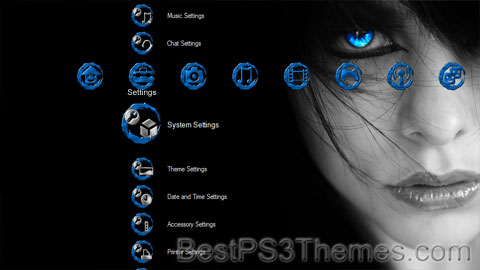
rev Blue 2

rev Blue 2 theme by revscott

Download: revBlue2.p3t

rev Blue 2 Theme
(1 background)

P3T Unpacker v0.12
Copyright (c) 2007. Anoop Menon

This program unpacks Playstation 3 Theme files (.p3t) so that you can touch-up an existing theme to your likings or use a certain wallpaper from it (as many themes have multiple). But remember, if you use content from another theme and release it, be sure to give credit!

Download for Windows: p3textractor.zip

Instructions:

Download p3textractor.zip from above. Extract the files to a folder with a program such as WinZip or WinRAR. Now there are multiple ways to extract the theme.

The first way is to simply open the p3t file with p3textractor.exe. If you don’t know how to do this, right click the p3t file and select Open With. Alternatively, open the p3t file and it will ask you to select a program to open with. Click Browse and find p3textractor.exe from where you previously extracted it to. It will open CMD and extract the theme to extracted.[filename]. After that, all you need to do for any future p3t files is open them and it will extract.

The second way is very simple. Just drag the p3t file to p3textractor.exe. It will open CMD and extract the theme to extracted.[filename].

For the third way, first put the p3t file you want to extract into the same folder as p3textractor.exe. Open CMD and browse to the folder with p3extractor.exe. Enter the following:
p3textractor filename.p3t [destination path]Replace filename with the name of the p3t file, and replace [destination path] with the name of the folder you want the files to be extracted to. A destination path is not required. By default it will extract to extracted.filename.
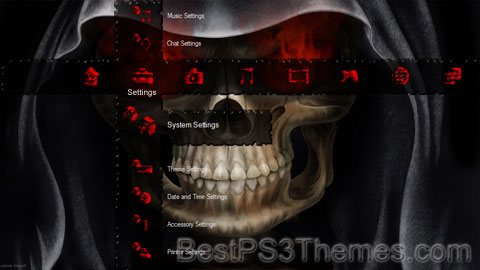
rev Blue

rev Blue theme by revscott

Download: revBlue.p3t

rev Blue Theme
(1 background)

P3T Unpacker v0.12
Copyright (c) 2007. Anoop Menon

This program unpacks Playstation 3 Theme files (.p3t) so that you can touch-up an existing theme to your likings or use a certain wallpaper from it (as many themes have multiple). But remember, if you use content from another theme and release it, be sure to give credit!

Download for Windows: p3textractor.zip

Instructions:

Download p3textractor.zip from above. Extract the files to a folder with a program such as WinZip or WinRAR. Now there are multiple ways to extract the theme.

The first way is to simply open the p3t file with p3textractor.exe. If you don’t know how to do this, right click the p3t file and select Open With. Alternatively, open the p3t file and it will ask you to select a program to open with. Click Browse and find p3textractor.exe from where you previously extracted it to. It will open CMD and extract the theme to extracted.[filename]. After that, all you need to do for any future p3t files is open them and it will extract.

The second way is very simple. Just drag the p3t file to p3textractor.exe. It will open CMD and extract the theme to extracted.[filename].

For the third way, first put the p3t file you want to extract into the same folder as p3textractor.exe. Open CMD and browse to the folder with p3extractor.exe. Enter the following:
p3textractor filename.p3t [destination path]Replace filename with the name of the p3t file, and replace [destination path] with the name of the folder you want the files to be extracted to. A destination path is not required. By default it will extract to extracted.filename.

Dark

Dark theme by Rume79

Download: Dark.p3t

Dark Theme
(3 backgrounds)

Redirect to:

The Vaio PSN

The Vaio PSN theme by Dj4NRv

Download: TheVaioPSN.p3t

The Vaio PSN Theme
(1 background)

P3T Unpacker v0.12
Copyright (c) 2007. Anoop Menon

This program unpacks Playstation 3 Theme files (.p3t) so that you can touch-up an existing theme to your likings or use a certain wallpaper from it (as many themes have multiple). But remember, if you use content from another theme and release it, be sure to give credit!

Download for Windows: p3textractor.zip

Instructions:

Download p3textractor.zip from above. Extract the files to a folder with a program such as WinZip or WinRAR. Now there are multiple ways to extract the theme.

The first way is to simply open the p3t file with p3textractor.exe. If you don’t know how to do this, right click the p3t file and select Open With. Alternatively, open the p3t file and it will ask you to select a program to open with. Click Browse and find p3textractor.exe from where you previously extracted it to. It will open CMD and extract the theme to extracted.[filename]. After that, all you need to do for any future p3t files is open them and it will extract.

The second way is very simple. Just drag the p3t file to p3textractor.exe. It will open CMD and extract the theme to extracted.[filename].

For the third way, first put the p3t file you want to extract into the same folder as p3textractor.exe. Open CMD and browse to the folder with p3extractor.exe. Enter the following:
p3textractor filename.p3t [destination path]Replace filename with the name of the p3t file, and replace [destination path] with the name of the folder you want the files to be extracted to. A destination path is not required. By default it will extract to extracted.filename.

The Style

The Style theme by Ross Sneddon

Download: TheStyle.p3t

The Style Theme
(3 backgrounds)

Redirect to:

  • From an alternative language: This is a redirect from a page name in Dutch to a page name in English. These words may directly translate or they may be related words, names or phrases.
    • This redirect leads to its target in accordance with the naming conventions for titles in other languages and can help writing and searches. However, per WP:NOTBROKEN do not replace these redirected links with a piped link unless the page is updated for another reason.

Odyssey BLU

Odyssey BLU theme by Dj4NRv

Download: OdysseyBLU.p3t

Odyssey BLU Theme
(1 background)

P3T Unpacker v0.12
Copyright (c) 2007. Anoop Menon

This program unpacks Playstation 3 Theme files (.p3t) so that you can touch-up an existing theme to your likings or use a certain wallpaper from it (as many themes have multiple). But remember, if you use content from another theme and release it, be sure to give credit!

Download for Windows: p3textractor.zip

Instructions:

Download p3textractor.zip from above. Extract the files to a folder with a program such as WinZip or WinRAR. Now there are multiple ways to extract the theme.

The first way is to simply open the p3t file with p3textractor.exe. If you don’t know how to do this, right click the p3t file and select Open With. Alternatively, open the p3t file and it will ask you to select a program to open with. Click Browse and find p3textractor.exe from where you previously extracted it to. It will open CMD and extract the theme to extracted.[filename]. After that, all you need to do for any future p3t files is open them and it will extract.

The second way is very simple. Just drag the p3t file to p3textractor.exe. It will open CMD and extract the theme to extracted.[filename].

For the third way, first put the p3t file you want to extract into the same folder as p3textractor.exe. Open CMD and browse to the folder with p3extractor.exe. Enter the following:
p3textractor filename.p3t [destination path]Replace filename with the name of the p3t file, and replace [destination path] with the name of the folder you want the files to be extracted to. A destination path is not required. By default it will extract to extracted.filename.