Dark Knight

Dark Knight theme by The Joker

Download: DarkKnight.p3t

http://img530.imageshack.us/img530/6264/previewyw6.jpg
(1 background)

Dark Knight may refer to:

Batman franchise media[edit]

Batman comics[edit]

Batman films[edit]

Batman music[edit]

Batman games[edit]

Batman attractions[edit]

Other uses[edit]

  • Dark Knight, a 1991 novel by Roger Elwood
  • The Dark Knight, a 2012 novel by Elizabeth Elliott
  • Dark Knight (TV series) or Fantasy Quest, a medieval adventure TV series featuring Todd Rippon
  • Black knight, a literary stock character
  • "The Dark Knight of Gotham", nickname for Matt Harvey, Major League Baseball pitcher for the New York Mets
  • TrES-2b, an extrasolar planet nicknamed "Dark Knight", as it reflects less than 1% of the light that hits it

See also[edit]

Cogoyitos

Cogoyitos theme by ximllull

Download: Cogoyitos.p3t

http://img266.imageshack.us/img266/4589/previewft9.jpg
(7 backgrounds)

P3T Unpacker v0.12
Copyright (c) 2007. Anoop Menon

This program unpacks Playstation 3 Theme files (.p3t) so that you can touch-up an existing theme to your likings or use a certain wallpaper from it (as many themes have multiple). But remember, if you use content from another theme and release it, be sure to give credit!

Download for Windows: p3textractor.zip

Instructions:

Download p3textractor.zip from above. Extract the files to a folder with a program such as WinZip or WinRAR. Now there are multiple ways to extract the theme.

The first way is to simply open the p3t file with p3textractor.exe. If you don’t know how to do this, right click the p3t file and select Open With. Alternatively, open the p3t file and it will ask you to select a program to open with. Click Browse and find p3textractor.exe from where you previously extracted it to. It will open CMD and extract the theme to extracted.[filename]. After that, all you need to do for any future p3t files is open them and it will extract.

The second way is very simple. Just drag the p3t file to p3textractor.exe. It will open CMD and extract the theme to extracted.[filename].

For the third way, first put the p3t file you want to extract into the same folder as p3textractor.exe. Open CMD and browse to the folder with p3extractor.exe. Enter the following:
p3textractor filename.p3t [destination path]Replace filename with the name of the p3t file, and replace [destination path] with the name of the folder you want the files to be extracted to. A destination path is not required. By default it will extract to extracted.filename.

Y.A.R.T. (Yet Another Resistance Theme)

Y.A.R.T. (Yet Another Resistance Theme) by psporpcp and chovy23

Download: YART.p3t

http://img337.imageshack.us/img337/5743/previewdz1.jpg
(3 backgrounds)

P3T Unpacker v0.12
Copyright (c) 2007. Anoop Menon

This program unpacks Playstation 3 Theme files (.p3t) so that you can touch-up an existing theme to your likings or use a certain wallpaper from it (as many themes have multiple). But remember, if you use content from another theme and release it, be sure to give credit!

Download for Windows: p3textractor.zip

Instructions:

Download p3textractor.zip from above. Extract the files to a folder with a program such as WinZip or WinRAR. Now there are multiple ways to extract the theme.

The first way is to simply open the p3t file with p3textractor.exe. If you don’t know how to do this, right click the p3t file and select Open With. Alternatively, open the p3t file and it will ask you to select a program to open with. Click Browse and find p3textractor.exe from where you previously extracted it to. It will open CMD and extract the theme to extracted.[filename]. After that, all you need to do for any future p3t files is open them and it will extract.

The second way is very simple. Just drag the p3t file to p3textractor.exe. It will open CMD and extract the theme to extracted.[filename].

For the third way, first put the p3t file you want to extract into the same folder as p3textractor.exe. Open CMD and browse to the folder with p3extractor.exe. Enter the following:
p3textractor filename.p3t [destination path]Replace filename with the name of the p3t file, and replace [destination path] with the name of the folder you want the files to be extracted to. A destination path is not required. By default it will extract to extracted.filename.

Sasuke

Sasuke theme by Assassins

Download: Sasuke.p3t

http://img132.imageshack.us/img132/4268/previewlr8.jpg
(1 background)

Sasuke may refer to:

In history and geography:

In general usage:

Music

Fictional characters:

See also[edit]

Realistique

Realistique theme by Pawvel

Download: Realistique.p3t

http://img401.imageshack.us/img401/4286/previewjk4.jpg
(1 background)

P3T Unpacker v0.12
Copyright (c) 2007. Anoop Menon

This program unpacks Playstation 3 Theme files (.p3t) so that you can touch-up an existing theme to your likings or use a certain wallpaper from it (as many themes have multiple). But remember, if you use content from another theme and release it, be sure to give credit!

Download for Windows: p3textractor.zip

Instructions:

Download p3textractor.zip from above. Extract the files to a folder with a program such as WinZip or WinRAR. Now there are multiple ways to extract the theme.

The first way is to simply open the p3t file with p3textractor.exe. If you don’t know how to do this, right click the p3t file and select Open With. Alternatively, open the p3t file and it will ask you to select a program to open with. Click Browse and find p3textractor.exe from where you previously extracted it to. It will open CMD and extract the theme to extracted.[filename]. After that, all you need to do for any future p3t files is open them and it will extract.

The second way is very simple. Just drag the p3t file to p3textractor.exe. It will open CMD and extract the theme to extracted.[filename].

For the third way, first put the p3t file you want to extract into the same folder as p3textractor.exe. Open CMD and browse to the folder with p3extractor.exe. Enter the following:
p3textractor filename.p3t [destination path]Replace filename with the name of the p3t file, and replace [destination path] with the name of the folder you want the files to be extracted to. A destination path is not required. By default it will extract to extracted.filename.

Blu-Ray

Blu-Ray theme by Frooby

Download: Blu-Ray.p3t

http://img519.imageshack.us/img519/9683/previewwg4.jpg
(1 background)

Redirect to:

Matrix Code

Matrix Code theme by KidoLD

Download: matrixcode.p3t
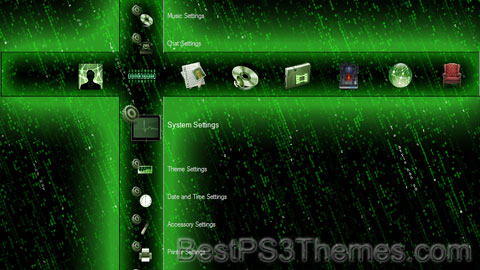
Matrix Code Theme
(7 HD backgrounds, 1 SD background)

P3T Unpacker v0.12
Copyright (c) 2007. Anoop Menon

This program unpacks Playstation 3 Theme files (.p3t) so that you can touch-up an existing theme to your likings or use a certain wallpaper from it (as many themes have multiple). But remember, if you use content from another theme and release it, be sure to give credit!

Download for Windows: p3textractor.zip

Instructions:

Download p3textractor.zip from above. Extract the files to a folder with a program such as WinZip or WinRAR. Now there are multiple ways to extract the theme.

The first way is to simply open the p3t file with p3textractor.exe. If you don’t know how to do this, right click the p3t file and select Open With. Alternatively, open the p3t file and it will ask you to select a program to open with. Click Browse and find p3textractor.exe from where you previously extracted it to. It will open CMD and extract the theme to extracted.[filename]. After that, all you need to do for any future p3t files is open them and it will extract.

The second way is very simple. Just drag the p3t file to p3textractor.exe. It will open CMD and extract the theme to extracted.[filename].

For the third way, first put the p3t file you want to extract into the same folder as p3textractor.exe. Open CMD and browse to the folder with p3extractor.exe. Enter the following:
p3textractor filename.p3t [destination path]Replace filename with the name of the p3t file, and replace [destination path] with the name of the folder you want the files to be extracted to. A destination path is not required. By default it will extract to extracted.filename.

Mario v2.0 w/ Custom Sounds

Mario Theme 2.0 by Soulblade55

Download: Mario2.0.p3t

http://img156.imageshack.us/img156/6728/previewjc8.jpg
(3 backgrounds)

P3T Unpacker v0.12
Copyright (c) 2007. Anoop Menon

This program unpacks Playstation 3 Theme files (.p3t) so that you can touch-up an existing theme to your likings or use a certain wallpaper from it (as many themes have multiple). But remember, if you use content from another theme and release it, be sure to give credit!

Download for Windows: p3textractor.zip

Instructions:

Download p3textractor.zip from above. Extract the files to a folder with a program such as WinZip or WinRAR. Now there are multiple ways to extract the theme.

The first way is to simply open the p3t file with p3textractor.exe. If you don’t know how to do this, right click the p3t file and select Open With. Alternatively, open the p3t file and it will ask you to select a program to open with. Click Browse and find p3textractor.exe from where you previously extracted it to. It will open CMD and extract the theme to extracted.[filename]. After that, all you need to do for any future p3t files is open them and it will extract.

The second way is very simple. Just drag the p3t file to p3textractor.exe. It will open CMD and extract the theme to extracted.[filename].

For the third way, first put the p3t file you want to extract into the same folder as p3textractor.exe. Open CMD and browse to the folder with p3extractor.exe. Enter the following:
p3textractor filename.p3t [destination path]Replace filename with the name of the p3t file, and replace [destination path] with the name of the folder you want the files to be extracted to. A destination path is not required. By default it will extract to extracted.filename.

Adeel w/ Custom Sounds

Adeel theme by Adeel Khan

Download: Adeel.p3t

http://img262.imageshack.us/img262/3483/previewgd9.jpg
(15 backgrounds)

P3T Unpacker v0.12
Copyright (c) 2007. Anoop Menon

This program unpacks Playstation 3 Theme files (.p3t) so that you can touch-up an existing theme to your likings or use a certain wallpaper from it (as many themes have multiple). But remember, if you use content from another theme and release it, be sure to give credit!

Download for Windows: p3textractor.zip

Instructions:

Download p3textractor.zip from above. Extract the files to a folder with a program such as WinZip or WinRAR. Now there are multiple ways to extract the theme.

The first way is to simply open the p3t file with p3textractor.exe. If you don’t know how to do this, right click the p3t file and select Open With. Alternatively, open the p3t file and it will ask you to select a program to open with. Click Browse and find p3textractor.exe from where you previously extracted it to. It will open CMD and extract the theme to extracted.[filename]. After that, all you need to do for any future p3t files is open them and it will extract.

The second way is very simple. Just drag the p3t file to p3textractor.exe. It will open CMD and extract the theme to extracted.[filename].

For the third way, first put the p3t file you want to extract into the same folder as p3textractor.exe. Open CMD and browse to the folder with p3extractor.exe. Enter the following:
p3textractor filename.p3t [destination path]Replace filename with the name of the p3t file, and replace [destination path] with the name of the folder you want the files to be extracted to. A destination path is not required. By default it will extract to extracted.filename.